I really like the Apple Home app: dark tiles, a badge that lights up, no thinking about protocols. What I don’t like is being limited to what Apple decides to surface, with the only escape hatch being HomeKit bridges.
Here’s the deal I actually want: the same experience, self-hosted, running on the Mac (or a Raspberry Pi) that already sits on my home network, talking to Home Assistant — which is already the brain of the house.
That turned out to be one Python file, standard library only. This post is a complete, verified walkthrough: every output below is from a real run.
What we’re building #
A little server that:
- Reads device state from Home Assistant’s REST API (
/api/states) - Serves an Apple Home–style UI: toggles, dimmer sliders, thermostats, sensors, door sensors
- Proxies taps/sliders back to HA service calls (
light.turn_on,climate.set_temperature, …) - Works from any phone or laptop on the home network — no app install
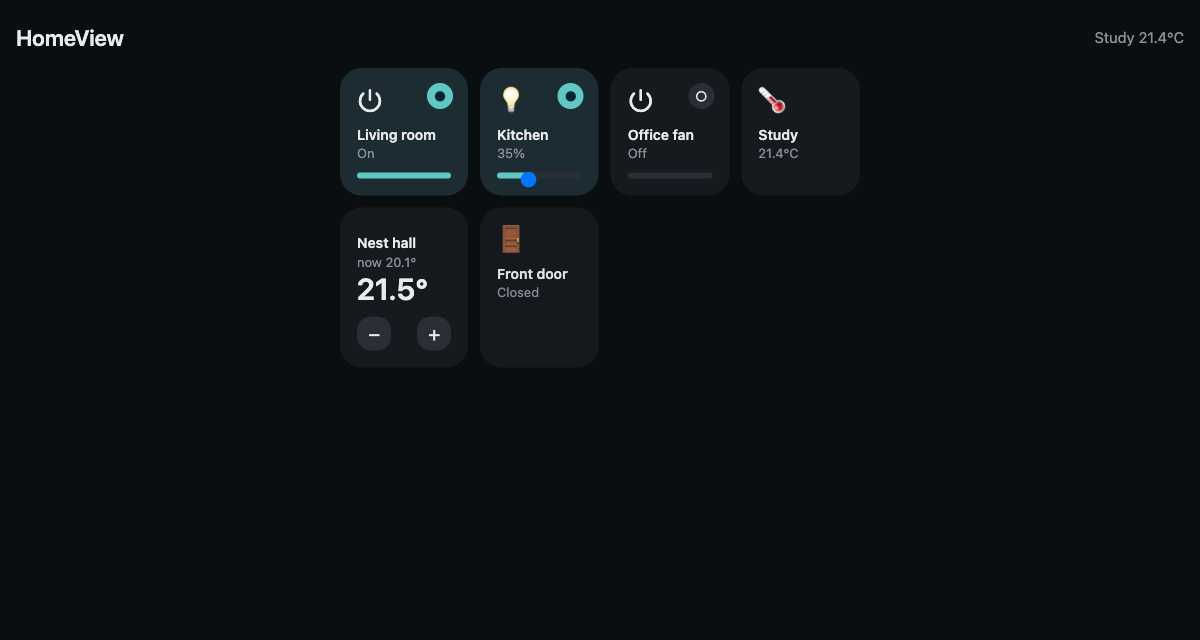
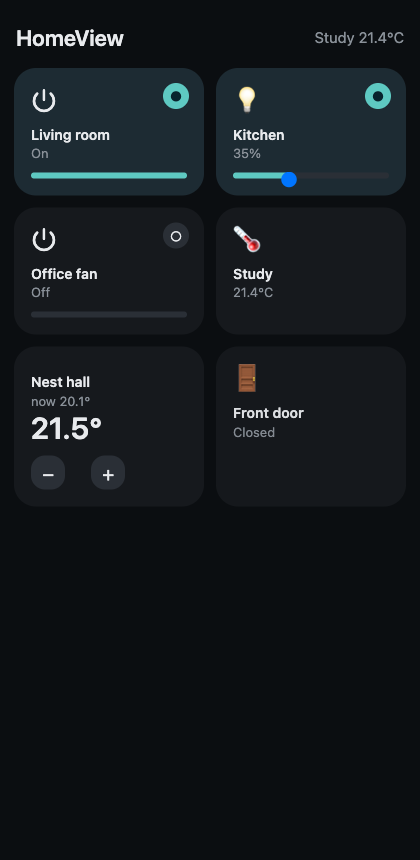
Here it is, running against my setup (this is a real screenshot, not a mockup):
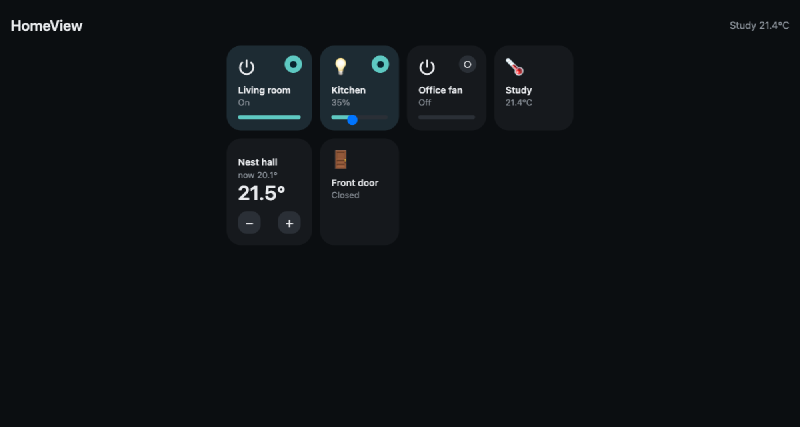
On a phone it goes to the familiar two-column Apple Home layout:
Architecture #
iPhone / laptop / iPad          Mac or Raspberry Pi             Home Assistant
┌──────────────────┐   http    ┌────────────────────┐  REST   ┌──────────────┐
│  Safari, LAN     │◄─────────►│  homeview_app.py   │◄───────►│ homeassistant│
│  Add-to-Home     │ :5055     │  stdlib HTTP       │ :8123   │ .local       │
└──────────────────┘           └────────────────────┘         └──────────────┘
                                        │
                                  your devices (Zigbee/Z-Wave/WiFi)
No cloud, no HomeKit bridge, no dependencies to install. If the router forwards nothing and the Pi is on the LAN, this simply is not reachable from outside the house.
Prerequisites #
- A Home Assistant instance on the LAN (
http://homeassistant.local:8123) - A long-lived access token: in Home Assistant → your avatar → Security → Long-lived access tokens → Create token. Copy it once; you won’t see it again.
- macOS or a Raspberry Pi with Python 3 (anything ≥3.7; zero pip installs)
Test it without a smart home first: the mock #
Because I want this post reproducible without physical devices, everything here
runs against a ~80-line mock Home Assistant (scripts/mock_homeassistant.py
in the repo). It implements exactly the two endpoints we need, with six fake
entities:
"""Minimal stand-in for the Home Assistant REST API, for offline demos/tests.

    python mock_homeassistant.py            # http://127.0.0.1:8125
"""
import json
from http.server import BaseHTTPRequestHandler, ThreadingHTTPServer

TOKEN = "mock-token"

states = {
    "light.living_room":        {"state": "on",  "attributes": {"friendly_name": "Living room", "brightness": 180}},
    "light.kitchen":            {"state": "off", "attributes": {"friendly_name": "Kitchen",     "brightness": 255}},
    "switch.office_fan":        {"state": "off", "attributes": {"friendly_name": "Office fan"}},
    "binary_sensor.front_door": {"state": "off", "attributes": {"friendly_name": "Front door", "device_class": "door"}},
    "sensor.study_temp":        {"state": "21.4", "attributes": {"friendly_name": "Study", "unit_of_measurement": "°C"}},
    "climate.thermostat":       {"state": "heat", "attributes": {"friendly_name": "Nest hall", "temperature": 21.5, "current_temperature": 20.1}},
}


def snapshot():
    # HA state objects always carry entity_id — keep that contract.
    return [{"entity_id": eid, **st} for eid, st in states.items()]


def apply_service(domain, service, payload):
    entity_id = (payload or {}).get("entity_id")
    if not entity_id or entity_id not in states:
        return
    attrs = states[entity_id]["attributes"]
    if domain == "light" and service in ("turn_on", "turn_off"):
        if service == "turn_on":
            states[entity_id]["state"] = "on"
            if "brightness" in (payload or {}):
                attrs["brightness"] = payload["brightness"]
        else:
            states[entity_id]["state"] = "off"
    elif domain == "switch" and service in ("turn_on", "turn_off"):
        states[entity_id]["state"] = "on" if service == "turn_on" else "off"
    elif domain == "climate" and service == "set_temperature":
        attrs["temperature"] = (payload or {}).get("temperature", attrs["temperature"])


class Handler(BaseHTTPRequestHandler):
    def _send(self, code, obj):
        body = json.dumps(obj).encode()
        self.send_response(code)
        self.send_header("Content-Type", "application/json")
        self.send_header("Content-Length", str(len(body)))
        self.end_headers()
        self.wfile.write(body)

    def do_GET(self):
        if self.headers.get("Authorization") != f"Bearer {TOKEN}":
            return self._send(401, {"message": "Unauthorized"})
        if self.path == "/api/states":
            return self._send(200, snapshot())
        self._send(404, {"message": "Not found"})

    def do_POST(self):
        if self.headers.get("Authorization") != f"Bearer {TOKEN}":
            return self._send(401, {"message": "Unauthorized"})
        parts = self.path.strip("/").split("/")      # api/services/<domain>/<service>
        if len(parts) == 4 and parts[0] == "api" and parts[1] == "services":
            length = int(self.headers.get("Content-Length", 0))
            payload = json.loads(self.rfile.read(length)) if length else {}
            apply_service(parts[2], parts[3], payload)
            return self._send(200, snapshot())
        self._send(404, {"message": "Not found"})

    def log_message(self, *args):
        pass


if __name__ == "__main__":
    print("mock Home Assistant on http://127.0.0.1:8125 — token: mock-token")
    ThreadingHTTPServer(("127.0.0.1", 8125), Handler).serve_forever()
The app: one file, three parts #
homeview_app.py has three pieces.
1. Config and HA plumbing #
import json, os, urllib.request
from http.server import BaseHTTPRequestHandler, ThreadingHTTPServer

HA_URL = os.environ.get("HA_URL", "http://homeassistant.local:8123").rstrip("/")
TOKEN  = os.environ.get("HA_TOKEN", "")
PORT   = int(os.environ.get("PORT", "5055"))

# tile: (entity_id, type)   type: toggle | dimmer | switch | sensor | climate | door
TILES = [
    ("light.living_room",        "toggle"),
    ("light.kitchen",            "dimmer"),
    ("switch.office_fan",        "switch"),
    ("sensor.study_temp",        "sensor"),
    ("climate.thermostat",       "climate"),
    ("binary_sensor.front_door", "door"),
]

API_HEADERS = {"Authorization": f"Bearer {TOKEN}", "Content-Type": "application/json"}


def ha_get(path):
    req = urllib.request.Request(f"{HA_URL}{path}", headers=API_HEADERS)
    with urllib.request.urlopen(req, timeout=10) as r:
        return json.loads(r.read())


def ha_service(domain, service, payload):
    req = urllib.request.Request(
        f"{HA_URL}/api/services/{domain}/{service}",
        data=json.dumps(payload).encode(),
        headers=API_HEADERS, method="POST")
    with urllib.request.urlopen(req, timeout=10) as r:
        return json.loads(r.read())
The tile list is the entire configuration surface — add a line, get a tile. Editing no HTML for new devices of an already-known type.
2. The UI #
One HTML string served at /. The styling does the heavy lifting for the Apple
look — big radii, near-black cards, a single accent, badges instead of
checkboxes:
:root{--bg:#0b0e11;--card:#16191d;--card-on:#1d2b33;--sub:#8a9199;--on:#5ec9c2;}
.grid{display:grid;grid-template-columns:repeat(2,1fr);gap:12px;max-width:520px;margin:0 auto}
@media(min-width:760px){.grid{grid-template-columns:repeat(4,1fr)}}
.tile{background:var(--card);border-radius:22px;padding:16px;min-height:110px;
 position:relative;cursor:pointer;transition:border .15s,transform .1s}
.tile.on{background:var(--card-on)}
.tile:active{transform:scale(.97)}                       /* iOS press feedback */
.tile .badge{position:absolute;top:14px;right:14px;width:26px;height:26px;
 border-radius:50%;background:#2a2f36}
.tile.on .badge{background:var(--on);color:#08242e}
The JavaScript is tiny because the state contract is tiny. It polls every 5 s, and taps are optimistic: the tile flips instantly, the service call follows:
async function toggle(id){
  const st = find(id), domain = id.split('.')[0], on = st.state === 'on';
  st.state = on ? 'off' : 'on'; render();               // optimistic flip
  await fetch('/api/services/' + domain + '/' + (on ? 'turn_off' : 'turn_on'),
    {method:'POST', headers:{'Content-Type':'application/json'},
     body: JSON.stringify({entity_id: id})});
}
Dimmers get a native <input type=range> that commits on release; the
thermostat is two buttons firing climate.set_temperature in ±0.5° steps.
3. The HTTP server #
class Handler(BaseHTTPRequestHandler):
    def do_GET(self):
        if self.path == "/":
            html = PAGE.replace("__TILES__", json.dumps(TILES))
            return self._send(200, html.encode(), "text/html; charset=utf-8")
        if self.path == "/api/states":
            wanted = {e for e, _ in TILES}
            states = [s for s in ha_get("/api/states") if s["entity_id"] in wanted]
            return self._send(200, json.dumps(states).encode())
        self._send(404, b'{"error":"not found"}')

    def do_POST(self):
        length = int(self.headers.get("Content-Length", 0))
        payload = json.loads(self.rfile.read(length)) if length else {}
        parts = self.path.strip("/").split("/")
        if len(parts) == 4 and parts[0] == "api" and parts[1] == "services":
            return self._send(200, json.dumps(ha_service(parts[2], parts[3], payload)).encode())
        self._send(404, b'{"error":"not found"}')
Note len(parts) == 4 — /api/services/light/turn_off splits into
four segments. My first draft checked for three and every toggle silently
404’d. A classic proxy off-by-one; the fix is in both the mock and the app.
Run it #
# terminal 1 — fake devices (or skip if you have real HA)
python3 scripts/mock_homeassistant.py

# terminal 2 — the dashboard
HA_URL=http://127.0.0.1:8125 HA_TOKEN=mock-token PORT=5055 python3 scripts/homeview_app.py
# HomeView  http://192.168.0.102:5055   (HA: http://127.0.0.1:8125)
Real session against the running stack — state listing:
light.living_room = on, light.kitchen = off, switch.office_fan = off,
binary_sensor.front_door = off, sensor.study_temp = 21.4, climate.thermostat = heat
Turning things off/on and dimming through the proxy (raw curl, exactly what the tiles send):
POST /api/services/light/turn_off   {"entity_id": "light.living_room"}
POST /api/services/light/turn_on    {"entity_id": "light.kitchen", "brightness": 90}
POST /api/services/climate/set_temperature {"entity_id": "climate.thermostat", "temperature": 23}
Result, re-reading state afterwards:
light.living_room = off 180
light.kitchen     = on 90
climate.thermostat = heat  23
Toggles, dimmer levels and setpoints — the full loop works round-trip.
Make it permanent #
On a Mac — a launchd agent starts it at login:
cp scripts/homeview_app.py ~/bin/ && mkdir -p ~/Library/LaunchAgents
cat > ~/Library/LaunchAgents/local.homeview.plist << 'EOF'
<?xml version="1.0" encoding="UTF-8"?>
<!DOCTYPE plist PUBLIC "-//Apple//DTD PLIST 1.0//EN" "http://www.apple.com/DTDs/PropertyList-1.0.dtd">
<plist version="1.0"><dict>
  <key>Label</key><string>local.homeview</string>
  <key>ProgramArguments</key><array>
    <string>/usr/bin/python3</string><string>/Users/YOU/bin/homeview_app.py</string>
  </array>
  <key>EnvironmentVariables</key><dict>
    <key>HA_URL</key><string>http://homeassistant.local:8123</string>
    <key>HA_TOKEN</key><string>YOUR_LONG_LIVED_TOKEN</string>
  </dict>
  <key>RunAtLoad</key><true/>
  <key>KeepAlive</key><true/>
</dict></plist>
EOF
launchctl load ~/Library/LaunchAgents/local.homeview.plist
On a Raspberry Pi — systemd:
# /etc/systemd/system/homeview.service
[Unit]
Description=HomeView dashboard
After=network-online.target

[Service]
User=pi
Environment=HA_URL=http://homeassistant.local:8123
Environment=HA_TOKEN=YOUR_LONG_LIVED_TOKEN
ExecStart=/usr/bin/python3 /home/pi/homeview_app.py
Restart=always

[Install]
WantedBy=multi-user.target
sudo systemctl enable --now homeviewThe Pi bonus: it’s always on, sips ~2 % CPU with this server, and the dashboard survives router reboots because nothing external is involved.
A token, two secrets, three rules #
- Never commit the token. It’s passed via environment / plist / unit file.
(If you
git grep HA_TOKENand find one —rotate it immediately.) - Port 5055 listens on
0.0.0.0so phones can reach it — that also means every LAN guest can. The app proxies auth to HA, but if your guests are sketchy, bind to a non-routable interface or add a catch-all auth check indo_GET/do_POST(five lines behind an env var). - No port forwarding, ever. If you need it outside the house, that’s a job for a VPN (WireGuard, Tailscale) — not for opening 5055.
Bonus: inside the Home Assistant app itself #
Since the dashboard is just a web page, you can embed it in the HA sidebar
with a webpage card — this snippet is from my existing
create_ha_dashboard.py (HassIO websocket, token auth, idempotent):
CONFIG = {
    "version": 1,
    "views": [{
        "title": "HomeView",
        "panel": True,
        "cards": [
            {"type": "webpage", "url": "http://192.168.0.102:5055/", "title": ""}
        ],
    }],
}
Then the official HA iOS app gets a HomeView panel button that renders our tiles full-screen — the best of both: native app shell, our UI inside.
What to remember #
- The Home Assistant REST API is small:
GET /api/states+POST /api/services/<domain>/<service>cover ~90 % of dashboard needs - Optimistic UI updates make a 5-second-polling dashboard feel instant
- One stdlib file ≈ zero deploy ceremony — if it runs Python 3, it hosts this
- Keep entity routing in one
TILESlist; the UI and the proxy both read it - Test protocol-adjacent code against a 60-line mock first; it found two real
bugs (the path-split off-by-one and a missing
entity_id) before I touched anything live
Full sources: scripts/homeview_app.py, scripts/mock_homeassistant.py in the
post repo.